This isn't a post about AI. It's a post about a system that happens to use AI — and why the system matters more than the tool.
The Portfolio
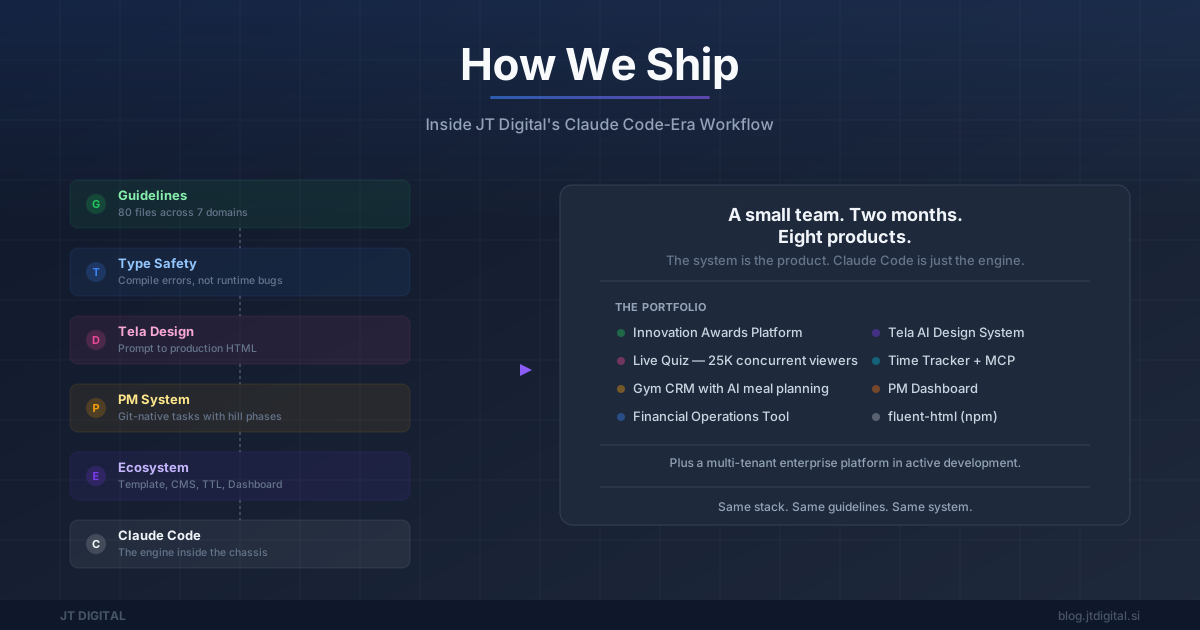
A small team. Two months. Eight products live or in active development.
A national innovation awards platform for the Chamber of Commerce. A real-time quiz for 25,000 concurrent viewers on national television. A gym management platform. A financial operations tool. An AI design system — 41,500 lines of TypeScript. A time tracker. A PM dashboard. A type-safe HTML framework published on npm.
Plus a multi-tenant enterprise platform for a large client, currently in active development.
The enterprise platform alone — just one of the eight, built in less than one week — tells the story:
Nearly 1:1 code-to-test parity — on a single project. And it's still going.
Every project runs on the same stack: Fastify + TypeScript + fluent-html + HTMX + Tailwind CSS. Every project shares the same guidelines, the same template, the same tooling.
The immediate question: how?
The wrong answer: "we just used AI."
The right answer: we built a system where AI can operate at full capacity. Claude Code is the engine, but it's operating inside a chassis we designed — project management, coding guidelines, a type-safe framework, custom tooling, deployment automation. Each layer removes a category of friction. Together, they compound.
Let's walk through it.
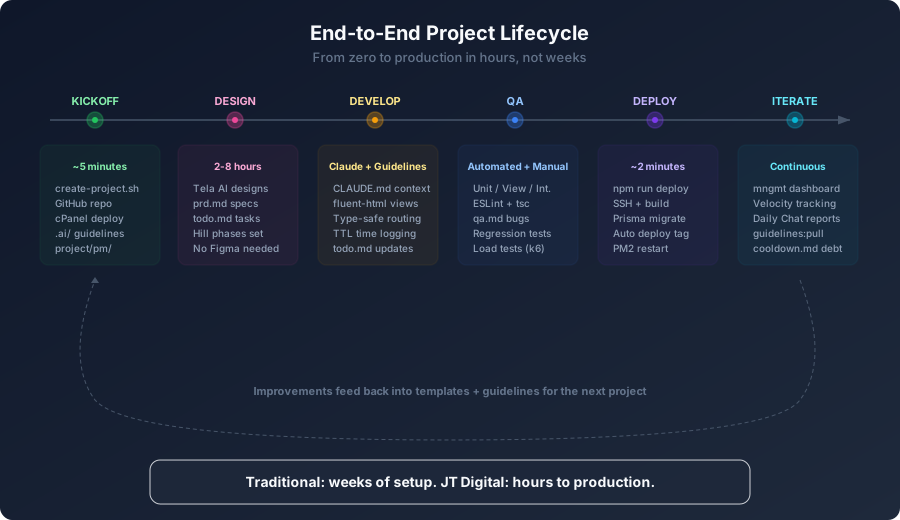
The full lifecycle — from zero to production in hours, with improvements feeding back into templates and guidelines for the next project.
The PM System — Work That Discovers Itself
The bottleneck in AI-assisted development is not writing code. It's knowing what to write.
We don't use Jira. We don't use Linear. We don't use Notion. Our project management lives in plain markdown files committed to git — requirements, tasks, bugs, and architecture decisions, organized by epics and features.
The methodology is Shape Up: fixed time, variable scope. Tasks aren't prescribed upfront in a backlog. They're discovered during the build. The task file tracks committed scope — what's actually being worked on right now — not a wishlist of everything that might eventually matter.
Every user story is marked with a hill phase: uphill (still figuring it out) or downhill (all decisions made, execute). This is the key insight. AI handles execution speed — once decisions are made, Claude can write code faster than we can type requirements. The real bottleneck is unclear requirements and unresolved decisions. Hill phases make that bottleneck visible.
It reads the bug tracker, then the current tasks with priorities and hill phases, then the requirements. Full project context in seconds — no ticket hunting, no "let me catch you up."
Architecture decisions are recorded alongside the code. When Claude reads "we chose X over Y because Z," it doesn't re-litigate settled choices. It just builds.
We built an internal PM dashboard that reads these markdown files via GitHub API, renders visual progress, tracks velocity from git history, and posts daily progress reports to Google Chat. Nobody manually updates a PM tool. The project is the status report.
The enterprise project has hundreds of tracked tasks across multiple epics, with architecture decisions formally documented. The dashboard derives all velocity metrics from git history across every project. No one opens a PM tool to update status.
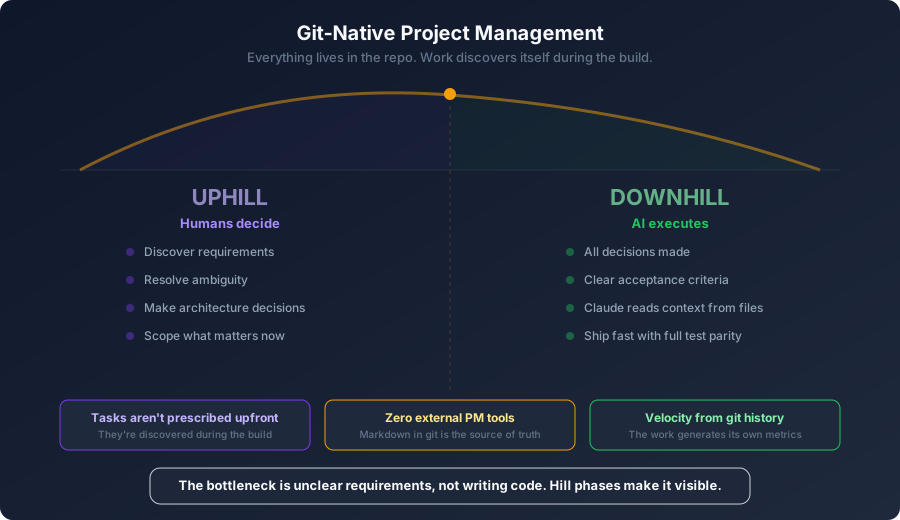
The PM system — everything lives in the repo. Hill phases make the real bottleneck visible: unclear requirements, not writing code.
The Guidelines — Teaching AI Your Codebase
Claude Code's output quality is directly proportional to the quality of the instructions it receives. Guidelines are the highest-return investment in the entire system.
Every project ships with dozens of structured guideline files across multiple domains — from web development and QA to marketing and project management.
The root CLAUDE.md is a concise switchboard. It declares the stack, states the critical rules, and links to deeper files. It's what Claude reads first, every session.
Most sessions load a few hundred lines. The full library is thousands of lines, loaded on demand through a "read when relevant" pattern: CLAUDE.md links to domain-specific guides with explicit triggers — "read when implementing tracking," "read when writing tests," "read when building views." Claude pulls in the right context at the right time, not everything at once.
What makes these guidelines effective is that they're prescriptive, not descriptive. They don't say "strive for clean code." They say "use defineRoutes for routing — never hardcode URL strings." Every rule has a code example with ✓ and ✗ markers. Every "never" has a reason.
Guidelines are authored in a central repo and pulled into every project via a version-checked script. All projects share the same knowledge base. An improvement to one guideline benefits every project on the next sync.
The compound effect with types: guidelines tell Claude how to write code, TypeScript catches what it gets wrong, and a custom ESLint plugin (16 rules, 8 with auto-fix) catches framework-specific mistakes. Three layers of correctness enforcement — instruction, compilation, and linting — before any code reaches a human.
Every project in the portfolio runs on the same guideline set. The result: consistent patterns across all our codebases. defineRoutes for routing, handle(server, ...) for controllers, setHtmx for navigation. A new project inherits the same conventions from day one.
The Stack — Why SSR + Type Safety Is the AI-Optimal Architecture
Every technology choice in our stack was made because it reduces the surface area for AI mistakes.
The stack: Fastify v5 + TypeScript + fluent-html + HTMX + Tailwind CSS. Fully server-rendered, no client-side framework, ~14KB of client JavaScript total.
fluent-html is a type-safe HTML builder we built in-house and published on npm. Every HTML element is a factory function with chainable methods. Div(H1("Title"), P("Body")) instead of JSX or template strings. ~15KB minified, zero dependencies.
Why it matters for AI: fluent methods have one correct way to express each style. .background("blue-500") is the only way to set a blue background — there's no competing abstraction to choose between (styled-components vs Tailwind strings vs CSS modules vs inline styles). One correct pattern means a higher probability Claude picks the right one on the first attempt.
The Tailwind integration is fully typed: .padding("x", "4"), .on("hover", t => t.background("blue-600")), .at("md", t => t.textSize("lg")) — all checked at compile time. No class string typos.
Type Safety That Catches AI Mistakes at Compile Time
The type system doesn't just validate — it makes entire categories of mistakes unrepresentable. Here's what that looks like in practice.
Grammar-based HTMX types. Swap strategies, triggers, and sync modes aren't flat string enums — they're composable grammars built from template literal types. "outerMorph" is valid. "outerMorph scroll:top settle:200ms" is valid. "outerMorph scrolll:top" is a compile error. The AI gets autocomplete for every valid combination and a red squiggle for every invalid one.
Void elements reject children. Img() and Input() have distinct type signatures that make Img("alt text") a compile error. The AI can't accidentally nest content inside a self-closing tag — the overload simply doesn't exist.
Discriminated unions with Match. Page states aren't bags of optional booleans — they're tagged unions. Match(state, "status", { loading: () => ..., error: (s) => Alert(s.message) }) narrows the type per branch. Add a new variant and forget to handle it? Compile error on every Match call site.
Nullable narrowing with IfThen. IfThen(user.avatar, (src) => Img().setSrc(src)) passes the non-null value into the callback — no ! assertions, no re-checking. The AI never writes user.avatar! because the API makes the assertion unnecessary.
Branded types prevent ID mixups. A UserId and a ProjectId are both strings at runtime, but the compiler treats them as incompatible types. Pass a project ID where a user ID is expected? Compile error — even though both are valid UUIDs.
XSS protection by default. All text content is auto-escaped. Div(userInput) renders as safe HTML — <script>, not <script>. Raw HTML requires an explicit Raw() opt-in. The AI can't accidentally introduce injection vulnerabilities because the safe path is the only path.
Routes and IDs complete the picture — defineRoutes extracts path parameters into required typed arguments, defineIds validates HTMX targets against a registry, and assertNever enforces exhaustive handling. Every invalid state the AI could produce becomes a compile error — caught before runtime, before deployment, before a user ever sees it.
SSR Eliminates an Entire Category of AI Bugs
No hydration. No "use client". No hooks. No re-renders. No bundle splitting. One mental model, one execution environment. This removes an entire category of bugs that AI coding assistants commonly produce with React and Next.js — useEffect timing issues, hydration mismatches, client/server boundary confusion, state synchronization. Our stack has none of them.
The supporting ecosystem reinforces this: a custom ESLint plugin auto-fixes setClass("bg-red-500 p-4") into .background("red-500").padding("4"). A custom Tailwind extractor teaches Tailwind to read fluent method calls. The tools work together — framework, linting, and build — to make it difficult to write incorrect code.
Here's a real example of what all these layers look like working together — route definition and a typed view reference side by side:
// time-tracking.routes.ts — define once
export const timeTrackingRoutes = defineRoutes("/time-tracking", {
  project:     { method: "get",  path: "/:projectId" },
  createEntry: { method: "post", path: "/:projectId" },
  removeEntry: { method: "post", path: "/:projectId/entries/:entryId/remove" },
} as const);

export const timeTrackingIds = defineIds(["time-logs-section"] as const);
// dashboard.view.ts — reference everywhere
A(project.name)
.setHtmx(timeTrackingRoutes.project(
{ projectId: project.id }, // ← typed params — omit and it won't compile
{ target: layoutIds.mainContent, // ← typed ID — typo won't compile
swap: "outerMorph show:window:top", // ← typed swap strategy
pushUrl: true },
))
.cursor("pointer")
.textColor("white").fontWeight("semibold")
.on("hover", t => t.textColor("accent"))The route path exists in one place. Rename it, and every reference updates or breaks at compile time. Forget a required param like projectId, and tsc catches it before you ever open a browser. This is what "type-safe routing" means in practice — not runtime 404s, but compile-time errors.
The stack proves itself across diverse domains — a real-time quiz handling 25,000 concurrent connections, a multi-tenant enterprise platform with complex role hierarchies, a financial tool with precise calculation requirements. Same type safety patterns, same compile-time guarantees, different problem domains.
The Tooling — An Ecosystem, Not a Collection
The internal tools we've built aren't separate utilities. They form a closed loop where each one removes friction from a specific phase and feeds data to the others.
Projects Template
One command scaffolds a production-ready project with opt-in modules: auth with OAuth providers (Google, Apple, GitHub, Microsoft), payments (Stripe, Wise), AI integration (Claude, OpenAI), email, file storage (S3/R2), Redis, job queues, analytics, and monitoring (Prometheus, Grafana, Loki) — plus deploy scripts and the full guidelines library. Roughly 5 minutes from zero to a running app with a GitHub repo and production deployment.
TTL (Time Tracking)
An internal time tracker with an MCP server. Claude Code logs time while it works — log_time({ userId, projectId, date, duration, description }). No timesheets, no forgetting to clock in. The AI assistant is the time tracker.
CMS
A Prisma-based headless CMS with a block editor, published as an internal package. Plugs into any fluent-html project. Powers this blog — the words you're reading right now.
PM Dashboard
The visual layer over the git-native PM files. Velocity tracking computed from git history. Daily Google Chat reports. Cross-project visibility. Nobody manually updates status — the dashboard reads the same markdown files the developers edit, and the same commit history that already exists.
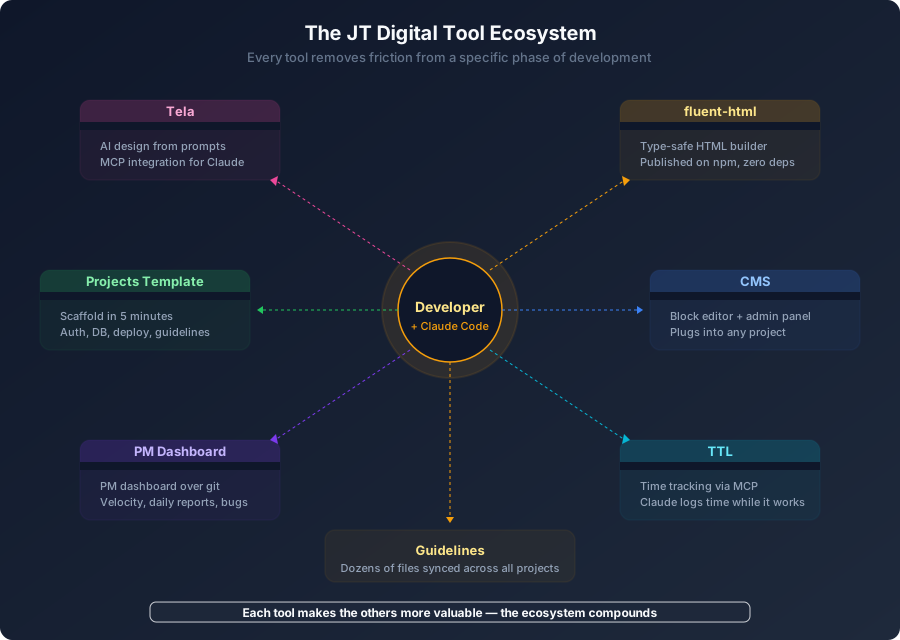
The ecosystem — each tool removes friction from a specific phase and feeds data to the others.
Tela — The Design-to-Code Bridge
The traditional design workflow is a relay race. A designer creates a mockup. There's a handoff meeting. A developer interprets it, rebuilds it in code. The designer reviews. Finds drift. Another iteration. Two people doing the same work twice, with fidelity loss at every handoff.
Tela generates production-ready HTML from natural language descriptions. 41,500 lines of TypeScript, built with Claude Opus.
Claude Code is implementing a feature. It calls create_project on Tela. 30–60 seconds later, a full design exists. Claude calls export_html, gets production-ready HTML, translates it to fluent-html views, and integrates it into the codebase. No human touched a design tool. The design output uses the same Tailwind CSS the production code uses. No translation loss.
Figma produces pictures of websites. Tela produces websites.
And Tela itself is built with Fastify + fluent-html + HTMX — the same stack it helps design for. It's the most complete proof that the system works: a tool for the system, built by the system.
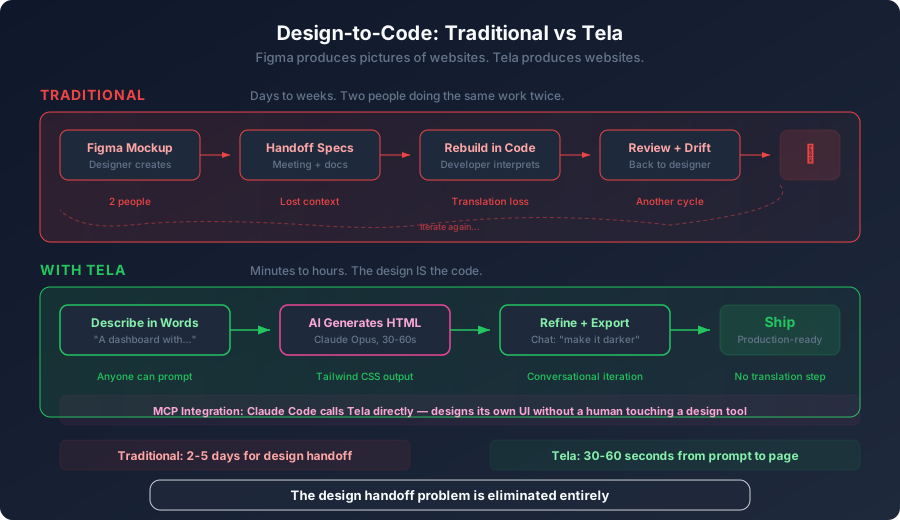
Traditional design takes days of relay between designer and developer. Tela eliminates the handoff entirely — 30 to 60 seconds from prompt to production-ready page.
Every tool feeds the others.
The template creates projects the dashboard can track. The guidelines the template ships make Claude more effective. TTL tracks time on projects managed in the dashboard. The CMS powers content on sites built from the template. Improvements to guidelines propagate to all projects on the next sync. No tool exists in isolation.
Every project in the portfolio bootstrapped from the same template — database, routing, deployment automation, and Docker infrastructure in place from minute one. The enterprise project went from npm init to deployed staging environment in under an hour. Same story for every other project in the portfolio. The template is why this pace is possible: you're never starting from scratch.
The Honest Part
Before the thesis lands, some things the numbers don't tell you.
fluent-html is verbose. A Div with three Tailwind methods is more characters than <div class="...">. The enterprise project's line count is higher than an equivalent JSX codebase would be — fluent methods trade brevity for type safety. We're not hiding this; it's a tradeoff we chose, and we'd make it again.
The template gives you a running start. Every project bootstraps with a shared UI component library, testing infrastructure, and coding guidelines already in place. The enterprise project's first sprint didn't start from zero — it started from a foundation that took months to build. The velocity numbers include that head start. That's the point: the system is the product.
Early sprints are faster than later ones. Scaffolding, CRUD, and layout come first — high output, low ambiguity. Domain-specific logic, edge cases, and integration work come later. The initial burst is real, but it's not the sustained rate.
This is explicitly AI-assisted. The velocity is not two humans typing faster. It's two humans directing an AI that operates within a system designed to make it effective. That's the thesis, not a caveat — but it means this isn't something you can replicate by hiring two fast developers.
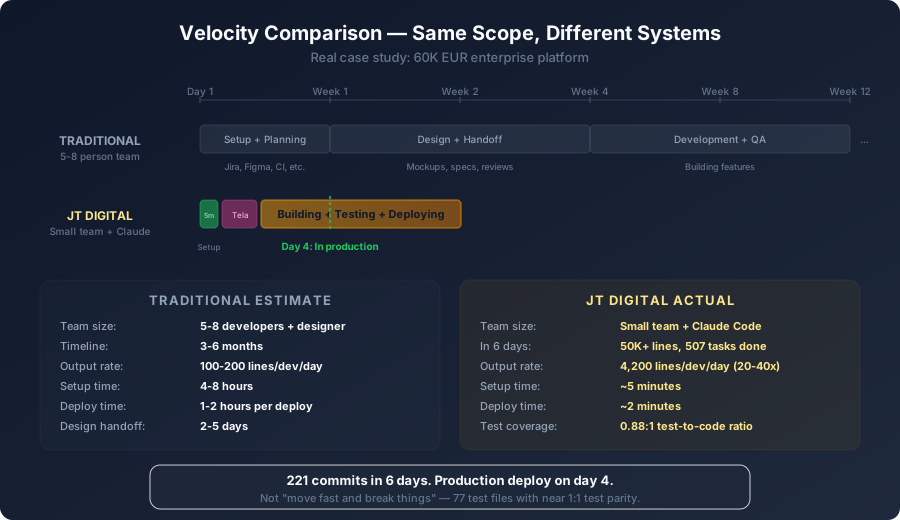
Same scope, different systems — More than 200 commits in the first sprint with production deploy on day 4, not by moving fast and breaking things, but with near 1:1 test-to-code parity.
The Compound Effect — Why "Just Use AI" Misses the Point
Each layer of this system makes the others more valuable. That's not a metaphor — it's the specific mechanism behind the output.
None of this works by installing Claude Code. There's no persistent context across sessions without the PM files. No structured work discovery without the hill phases. No type-safe framework constraining output. No automatic time tracking. No design-to-code pipeline without Tela. No cross-project compounding from shared guidelines.
The real question isn't "how fast can AI write code?" It's "how much of the surrounding work can you eliminate so AI can focus on the actual work?"
We eliminated the PM tool. We eliminated the design handoff — Claude calls Tela via MCP, gets production-ready HTML in 60 seconds, and translates it to fluent-html views without a human touching a design tool. We eliminated the timesheets. We eliminated the project scaffolding. We eliminated the class name typos. We eliminated the URL string mismatches. We eliminated the status update meetings.
What's left is the work itself — and a system that makes AI very good at doing it.
The system is the product. Claude Code is the engine, but the guidelines, PM structure, type-safe framework, Tela's design-to-code pipeline, MCP integrations, templates, and dashboard are the chassis. Without the chassis, the engine just spins.
Traditional teams move from idea to Figma to handoff to code to review to deploy — a relay race with fidelity loss at every baton pass. Our system moves from idea to Tela to fluent-html to production — one continuous pipeline where the AI carries the baton the entire way, constrained by types, guided by guidelines, and tracked by tools that update themselves.
Let's talk about your project.